RoomRack Mobile App
RoomRack Mobile App
Your Cloud PMS, wherever hotel operations take you.
Access key RoomRack Cloud PMS information and workflows from your phone or tablet, helping you stay connected to daily hotel operations even when you are away from the front desk.
Available through iOS and Android apps, with supported mobile web access as well.
Explore RoomRack Cloud PMS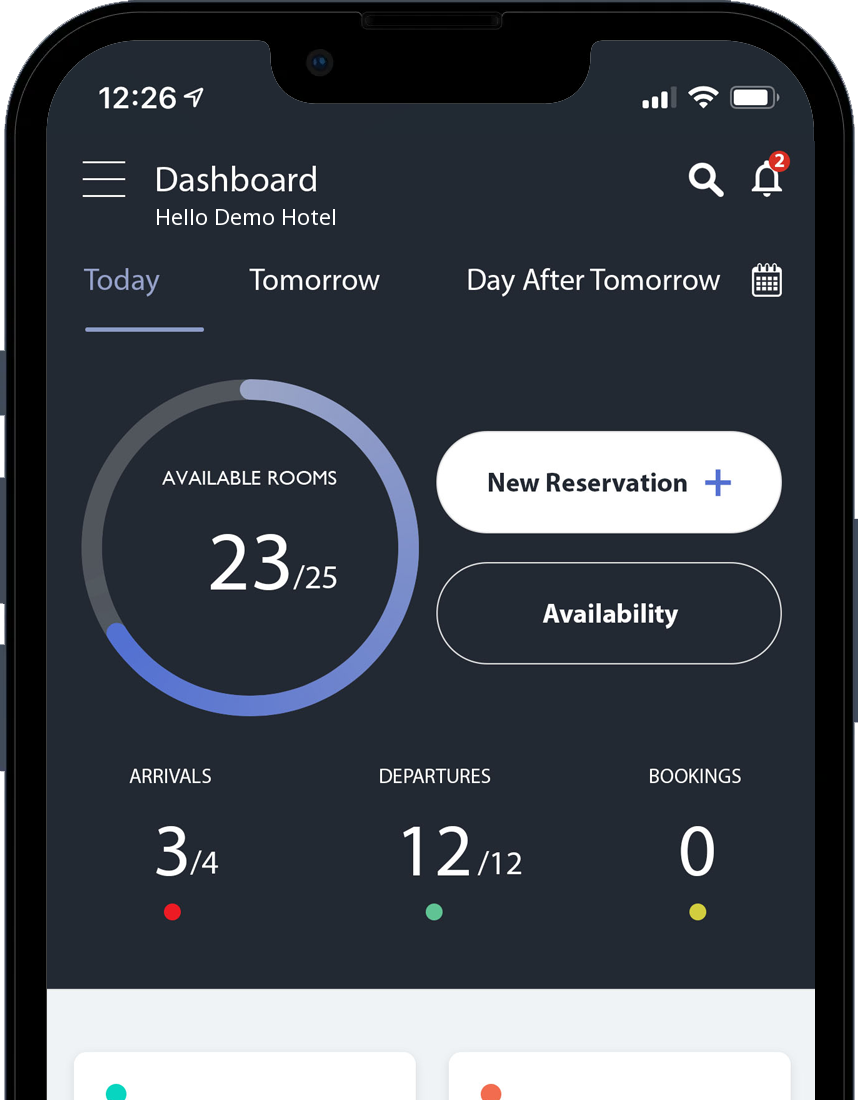
What is the RoomRack Mobile App?
The RoomRack Mobile App is the mobile experience of RoomRack Cloud PMS for hoteliers and operational teams who need access to key property information from a phone or tablet.
It connects with the same RoomRack environment and allows users to work with selected hotel operations without remaining at a desktop throughout the day.
Hotel operations do not stop at the front desk.
Hoteliers and operational teams are constantly moving around the property and beyond it.
Mobile access provides a quick view of important daily information and selected actions without requiring a return to the desktop.
Your daily property overview on mobile
See what is happening today at a glance.
The mobile experience can bring together key information such as available rooms, arrivals, departures and reservations, helping hotel teams maintain a clear daily operational view.
- Arrivals
- Departures
- Availability
- Reservation overview
- New reservation
Reservations accessible from mobile.
Access the reservation information you need through the RoomRack mobile experience and perform supported actions without depending on the front-desk computer.
Create a new reservation from mobile.
Where available for your account, you can start creating a new reservation directly through the RoomRack mobile experience.
Availability when you need it.
Check key availability information from mobile when responding to an enquiry or reviewing the property away from the front desk.
iOS · Android
RoomRack on iPhone, iPad and Android.
RoomRack provides apps for Apple and Android devices, giving Cloud PMS users mobile access to supported system capabilities.
Access from your browser too.
When the app is not being used, RoomRack can also be accessed through a supported mobile browser via the Cloud PMS web experience.
The app and browser access are not necessarily functionally identical.
Part of RoomRack Cloud PMS.
The RoomRack Mobile App is not a separate management system. It provides mobile access to RoomRack Cloud PMS and the capabilities supported for the relevant account and application version.
For hotel teams that are not always behind a desk.
The RoomRack Mobile App is designed for owners, managers and operational teams who need quick access to key PMS information while moving around the hotel or working away from the desk.
Download the RoomRack Mobile App.
Frequently asked questions
What is the RoomRack Mobile App?
It is the mobile experience of RoomRack Cloud PMS. It gives access to key property information and selected workflows from a phone or tablet.
Which devices is it available on?
There are apps for Apple devices on the App Store and for Android devices on Google Play. RoomRack can also be accessed through a supported mobile browser.
Is there an iPhone and iPad app?
Yes, the RoomRack Cloud PMS app is available on the App Store. Compatibility with specific models and software versions is shown on the store listing.
Is there an Android app?
Yes, the RoomRack Hotel PMS app is available on Google Play. Device compatibility is shown on the store listing.
Can I use RoomRack through a mobile browser?
Yes, through the Cloud PMS web experience in a supported mobile browser. Web access and the app are not necessarily functionally identical.
What information can I see from mobile?
The app's dashboard brings together available rooms, arrivals, departures and bookings for today and the following days. Availability can also be reached from there.
Can I create a new reservation from mobile?
The app includes a “New Reservation” action. Where available for your account, you can start creating a reservation from mobile.
Does the mobile app include every desktop PMS feature?
Not necessarily. The app focuses on key information and selected actions, while the full workflow remains in the Cloud PMS web environment.
Do I need a separate account for the Mobile App?
Access to the RoomRack Mobile App depends on the property's active RoomRack setup and service configuration. The RoomRack team can confirm the access method that applies to your account.
Hotel operations do not have to stay at the desk.
See how the RoomRack Mobile App gives you access to key Cloud PMS information while you are on the move.